Resume Keywords That Get You Hired: How to Find and Use the Right Terms for Any Job
Discover how to identify and strategically place keywords in your resume. Learn which keywords recruiters search for, how to extract them from job descriptions, and avoid common keyword mistakes.
Keywords are the secret language of hiring. They’re how recruiters search for candidates, how ATS systems filter applications, and how your resume demonstrates relevance to a specific role.
But finding the right keywords and using them effectively is where most job seekers struggle. Let’s change that.
Why Keywords Matter More Than Ever
Your resume is processed by algorithms before it reaches human eyes. These systems are looking for specific terms that indicate you’re qualified for the role.
Here’s what happens when you apply:
- ATS scans your resume for relevant keywords
- Your resume receives a score based on keyword matches
- Low-scoring resumes get filtered out automatically
- High-scoring resumes move to recruiter review
Studies show that 75% of resumes are rejected by ATS before a human ever sees them. The primary reason? Missing or misaligned keywords.
The Bottom Line: Keywords determine whether your resume gets seen by a human or filtered into the rejection pile.
Types of Keywords to Include
Hard Skills Keywords
These are technical abilities and certifications specific to your field:
| Industry | Example Keywords |
|---|---|
| Technology | Python, JavaScript, React, Angular, Node.js, Git, Docker, AWS, Agile, Scrum, DevOps |
| Marketing | SEO, SEM, PPC, Google Analytics, HubSpot, Content Marketing, Social Media, CRO |
| Finance | Financial Modeling, Forecasting, GAAP, IFRS, SAP, QuickBooks, Risk Management |
| Healthcare | HIPAA, EHR, Patient Care, Clinical Documentation, Medical Terminology |
| Legal | Due Diligence, Litigation, Compliance, Contract Review, Legal Research |
Soft Skills Keywords
While often overlooked, soft skills keywords are increasingly important:
| Category | Keywords |
|---|---|
| Leadership | Team management, Mentoring, Delegation, Strategic planning |
| Communication | Presentation, Negotiation, Stakeholder management, Written communication |
| Problem-solving | Analytical thinking, Critical thinking, Decision-making, Troubleshooting |
| Collaboration | Cross-functional teamwork, Relationship building, Conflict resolution |
Action Verbs
Strong action verbs make your achievements stand out:
| Context | Power Verbs |
|---|---|
| Leadership | Led, Directed, Managed, Oversaw, Spearheaded, Mentored |
| Achievement | Achieved, Exceeded, Delivered, Accomplished, Surpassed |
| Creation | Developed, Created, Designed, Built, Launched, Established |
| Improvement | Improved, Optimized, Streamlined, Enhanced, Transformed, Reduced |
| Analysis | Analyzed, Evaluated, Assessed, Identified, Researched, Discovered |
How to Extract Keywords from Job Descriptions
The most important keywords for your resume come directly from the job posting. Here’s a systematic approach:
Step 1: Gather Multiple Job Postings
Find 3-5 similar job postings for roles you’re targeting. This helps identify consistent requirements versus one-off preferences.
Step 2: Highlight Repeated Terms
Look for words and phrases that appear across multiple postings:
- Required skills and qualifications
- Preferred experience
- Responsibilities and duties
- Tools and technologies mentioned
Step 3: Categorize by Priority
| Priority | Where to Find | How to Use |
|---|---|---|
| Must-have | “Required qualifications” section | Include all that apply to you |
| Should-have | “Preferred qualifications” section | Include if you have the experience |
| Nice-to-have | General job description | Add where relevant |
Step 4: Check for Variations
The same skill might be described multiple ways:
| Skill | Common Variations |
|---|---|
| Microsoft Excel | Excel, Spreadsheets, Data Analysis |
| Project Management | PM, Managing Projects, Program Management |
| Customer Service | Client Relations, Customer Success, Account Management |
Pro Tip: Include the primary term plus one or two natural variations. ATS systems may search for different terms, so covering variations increases your match rate.
Skip the Manual Work: ReviseCV’s Resume Tailor automatically extracts keywords from any job posting and integrates them into your resume naturally. Paste a job description, get a tailored resume in about 2 minutes.
Strategic Keyword Placement
Where you place keywords matters as much as which ones you use.
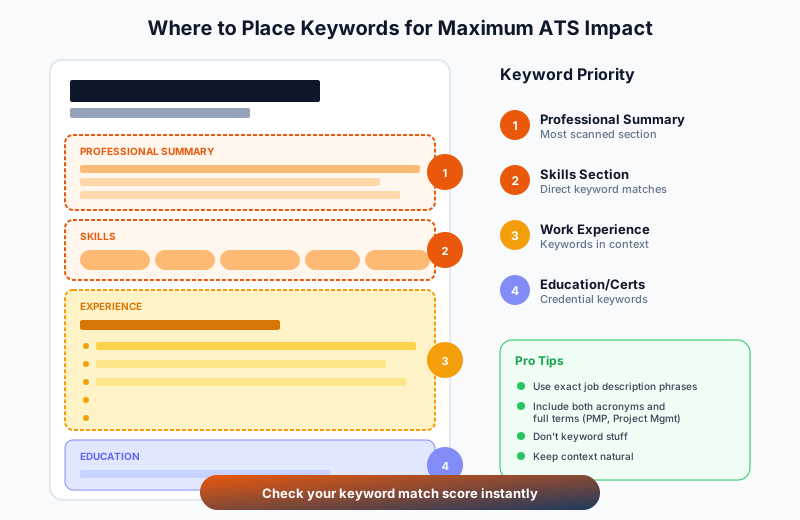
Professional Summary (Top of Resume)
This is prime real estate. Include your most important keywords here:
“Results-driven marketing manager with 7+ years of experience in digital marketing, SEO, and content strategy. Proven track record of increasing organic traffic by 150% and improving conversion rates through data-driven campaigns.”
Work Experience Section
Incorporate keywords naturally into your achievements:
| Instead of Writing… | Write This |
|---|---|
| “Responsible for marketing campaigns” | “Led digital marketing campaigns using Google Ads and Facebook Ads, generating 40% increase in qualified leads through A/B testing and conversion rate optimization” |
Skills Section
Create a dedicated skills section with relevant keywords:
| Category | Keywords |
|---|---|
| Technical Skills | Python, SQL, Tableau, Power BI, Machine Learning |
| Marketing | Google Analytics, SEO/SEM, HubSpot, Salesforce |
| Methodologies | Agile, Scrum, Data-Driven Decision Making |
Education and Certifications
Include relevant certifications with their full names and acronyms:
| Certification | Format to Use |
|---|---|
| PMP | Project Management Professional (PMP) |
| CPA | Certified Public Accountant (CPA) |
| AWS | AWS Certified Solutions Architect |
Why Both? ATS systems might search for either the acronym or the full name. Including both ensures you match regardless of how the recruiter searches.
Common Keyword Mistakes to Avoid
Mistake #1: Keyword Stuffing
Cramming in every possible keyword creates unreadable content:
| Don’t Write | Write Instead |
|---|---|
| “Marketing marketing manager experienced in marketing strategy, digital marketing, content marketing, email marketing, and marketing analytics” | “Marketing manager specializing in digital strategy, with expertise in content creation, email campaigns, and performance analytics” |
Mistake #2: Using Keywords Without Context
Keywords need to demonstrate actual experience:
| Don’t Write | Write Instead |
|---|---|
| “Skills: Project Management, Leadership, Communication” | “Led cross-functional team of 12 in delivering $2M software implementation project on time and under budget” |
Pro Tip: Resume Improver’s “Metrics” focus area helps you add quantified achievements to generic statements, turning skills lists into compelling proof of impact.
Mistake #3: Ignoring Job-Specific Keywords
Generic keywords won’t help you stand out. Tailor your keywords to each application.
Mistake #4: Missing Obvious Matches
If the job posting says “5+ years of Python experience” and you have it, make sure “Python” and your years of experience are clearly stated.
Mistake #5: Forgetting Synonyms
ATS systems may search for different terms. Include reasonable variations:
| Term | Synonyms to Include |
|---|---|
| Managed | Led, Oversaw, Supervised, Directed |
| Created | Developed, Built, Designed, Established |
| Improved | Optimized, Enhanced, Streamlined, Upgraded |
How to Find Industry-Specific Keywords
- LinkedIn - Review headlines, summaries, and skills sections of professionals in your target role
- Job Boards - Look at 10-20 similar postings on Indeed, LinkedIn, and Glassdoor for common requirements
- Industry Publications - Identify current terminology, emerging skills, and professional certifications
- Company Websites - See how companies describe their ideal candidates and team culture
Testing Your Keyword Strategy
Before submitting your resume:
- Compare to job description - Manually check that key requirements are addressed
- Use a keyword analyzer - Tools like ReviseCV can score your keyword alignment
- Read it aloud - If it sounds forced or unnatural, revise the phrasing
- Get feedback - Have someone in your industry review your keyword usage
Key Takeaways
- Extract keywords from job postings - Don’t guess what’s important
- Include hard skills, soft skills, and action verbs - Cover all keyword types
- Place strategically - Summary and work experience are most important
- Use naturally - Context matters more than frequency
- Tailor for each application - Generic keywords won’t cut it
- Test before submitting - Verify your keyword strategy works
Optimize Your Keywords Automatically
Finding the right keywords for every job application is time-consuming. ReviseCV does it for you:
- Resume Score - See which keywords you’re hitting and which you’re missing
- Resume Tailor - Automatically match your resume to any job description
- Resume Improver - Add context and metrics to make keywords count
Check your keyword match now → and see exactly how your resume aligns with your target roles.
Applying to multiple jobs? The Application Kit includes a tailored resume and cover letter together, so you can optimize for every application without spending hours.