Resume Format: PDF or Word? Which File Type to Submit
Should you send your resume as a PDF or Word document? Here's when to use each format and why it matters for ATS systems.
You’ve polished your resume. Now you need to submit it. But should you send a PDF or a Word document?
The short answer: PDF is usually better, but not always.
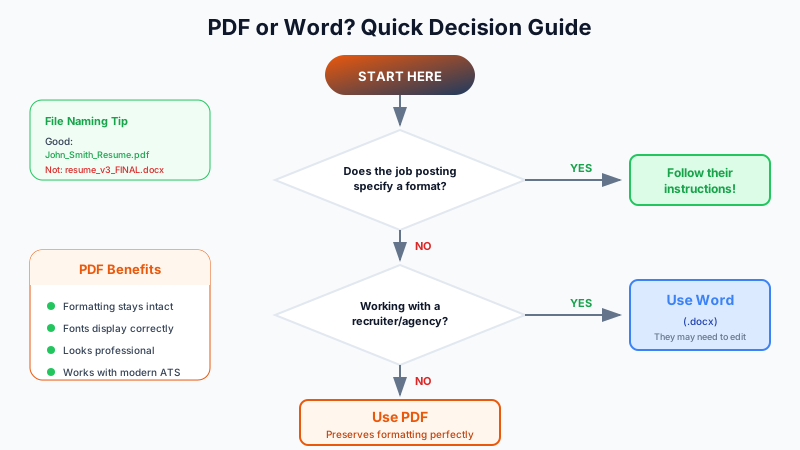
When to Use PDF
PDF is the safer choice in most situations:
- Formatting stays intact. Your carefully designed layout won’t break on different computers or operating systems.
- Fonts display correctly. No more “missing font” substitutions that make your resume look weird.
- It’s harder to edit. Some employers appreciate that the document can’t be easily altered.
- Professional appearance. PDFs look polished and intentional.
Use PDF when:
- The job posting doesn’t specify a format
- You’re emailing directly to a hiring manager
- You’re uploading to most job boards
- Your resume has any design elements or custom formatting
When to Use Word
Some situations call for .docx format:
- The posting specifically requests Word. Follow instructions. Always.
- Older ATS systems. Some legacy applicant tracking systems parse Word documents better than PDFs.
- Staffing agencies. Recruiters often need to edit resumes before presenting them to clients (removing contact info, reformatting to client templates).
Use Word when:
- The job posting explicitly asks for it
- You’re working with a recruiter or staffing agency
- The application system only accepts .doc or .docx
ATS Compatibility
Modern ATS systems handle both formats well. The “PDFs don’t work with ATS” myth is outdated. Most systems built after 2015 parse PDFs just fine.
What does matter:
- Keep it simple. Avoid tables, text boxes, headers/footers, and columns. These can confuse ATS regardless of format.
- Use standard fonts. Arial, Calibri, Times New Roman, Helvetica.
- Don’t use images for text. ATS can’t read text embedded in graphics.
File Naming
Whatever format you choose, name it professionally:
Good: FirstName_LastName_Resume.pdf
Bad: resume_final_v3_UPDATED.docx
Quick Reference
| Situation | Recommended Format |
|---|---|
| Job posting doesn’t specify | |
| Posting requests Word | Word (.docx) |
| Emailing to hiring manager | |
| Uploading to job board | |
| Working with recruiter | Word (.docx) |
| Application system only takes Word | Word (.docx) |
Export Options with ReviseCV
ReviseCV lets you export your resume in both PDF and Word formats, so you can submit whichever the employer requests.
A note on Word exports: Some design elements and custom styling may not carry over perfectly to Word format. This is a limitation of the .docx format itself. If precise formatting matters, PDF is always the cleaner option.
For applications that require Word, the exported .docx will contain all your content in a clean, ATS-friendly structure.
The Bottom Line
Default to PDF unless told otherwise. It preserves your formatting and works with modern ATS systems.
When in doubt, check the job posting instructions. Following directions is part of the application test.
Check if your resume is ATS-compatible → regardless of format.